Grabbable 오브젝트 만들기
VObject 에 플레이어가 잡고 조작 가능한 기능을 추가합니다. Grab/Place 모드, 이벤트 함수, RPC 동기화, FMOD 사운드 효과까지 장난감 총 예제로 학습합니다.
시작 전에 VObject 제작하기 를 먼저 읽어주세요.
VObject 에 상호작용을 추가하려면 VivenGrabbableModule 을 붙입니다.
Grabbable Module 기능
Module 은 Grab 모드와 Place 모드 두 가지를 제공합니다.
Grab 모드
플레이어가 물체를 잡고 이동하거나 기능을 사용하는 모드입니다. 물체는 플레이어 손을 따라다닙니다. 다음 이벤트를 VivenBehaviour 에서 정의해 반응을 구현합니다.
- onGrabEvent — 플레이어가 오브젝트를 잡았을 때
- onReleaseEvent — Grab 모드를 종료했을 때
- objectShortClickAction — 짧은 클릭
- objectLongClickAction — 길게 클릭(1초 기준) 후 떼었을 때
- objectHoldActionStart — 길게 클릭을 유지하기 시작한 순간
- objectHoldActionEnd — 길게 클릭 유지 후 뗐을 때
HoldAction 과 ClickAction 을 같이 사용할 경우 실행 순서를 보장할 수 없습니다. 두 이벤트 종류를 함께 쓰는 것은 권장되지 않습니다.
Place 모드
오브젝트를 배치·회전하거나 다른 오브젝트에 붙일 수 있는 모드입니다. AttachPoint 를 지정하면 조립·블록 쌓기를 구현할 수 있습니다.
이벤트 등록 방법
동명의 함수를 Lua 에 정의하면 이벤트와 함께 호출됩니다. 명시적으로 콜백을 AddListener 할 수도 있습니다.
function start()
  local grabbableModule = self:GetComponent("GrabbableModule")

  -- 명시적 Callback 등록
  grabbableModule.onGrab:AddListener(Foo)
end

function Foo()
  Debug.Log("Grabbed")
end

-- 동명 함수로 자동 등록됨
function objectShortClickAction()
  Debug.Log("objectShortClickAction : Shoot")
end
Grab Hand Pose · Grab Point 설정
GrabbableModule 의 Advanced 섹션에서 Grab 시 손의 모양과 위치를 커스터마이즈할 수 있습니다.
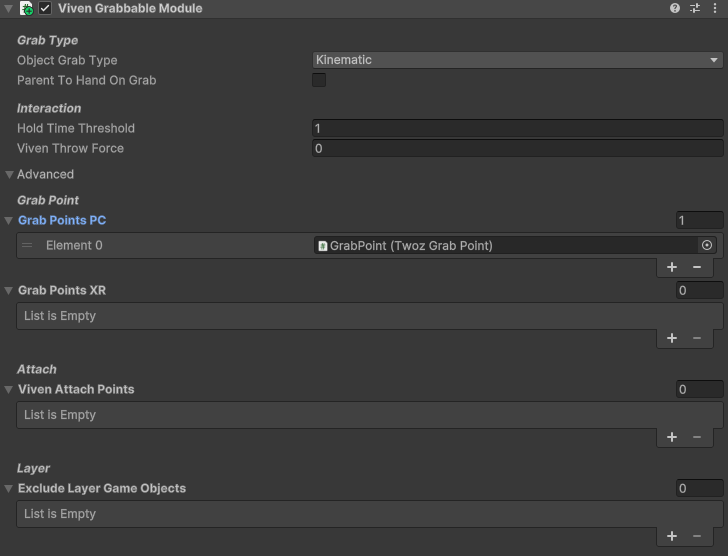
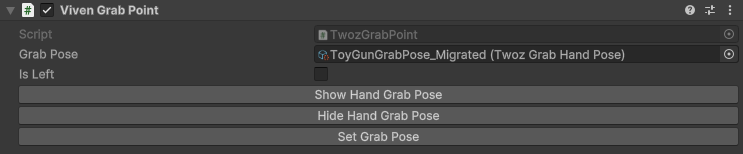
- Grab Point 는 GameObject 에 TwozGrabPoint 컴포넌트를 추가해 만듭니다.
- VR 과 PC 에서 별도의 Grab Point 를 지정하면 UX 를 세밀하게 조정할 수 있습니다.
- Grab Point 가 없으면 물체의 중심이 자동으로 Grab Point 가 됩니다.
- 설정한 GrabPose 는 ScriptableObject 로 저장해 다른 VObject 와 공유할 수 있습니다.
VivenLuaBehaviour 동기화
VivenLuaBehaviour 는 각 클라이언트에서 실행됩니다. 다른 클라이언트에서 동시에 실행시키려면 RPC 를 사용해야 합니다.
RPC 예제 — 장난감 총 발사
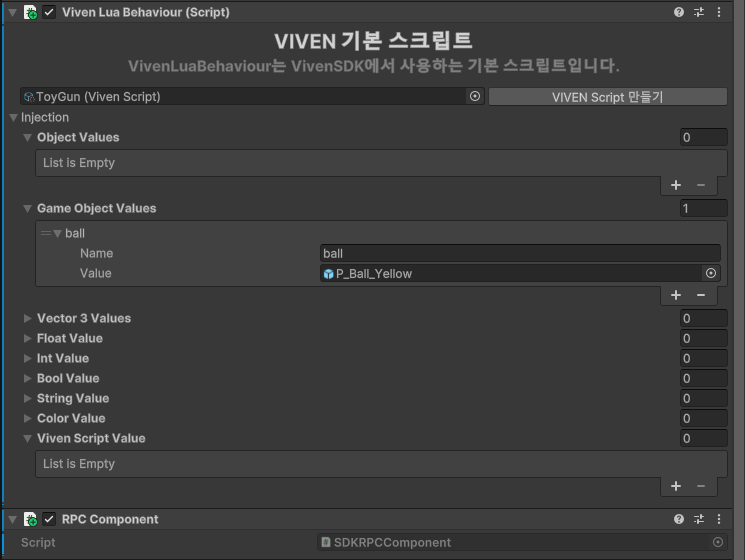
-- injection
-- ball : GameObject (P_Ball_Yellow)
local rpcComponent
local ballRigidBody = nil

function start()
  rpcComponent = self:GetComponent(typeof(RPCComponent))
  ballRigidBody = ball:GetComponent("Rigidbody")
  ball:SetActive(false)
end

function objectShortClickAction()
  local shootForce
  if Player.Mine.PlayMode == "PC" then
    local screenCenterPoint = Input.mousePosition
    local ray = Ray(self.transform.position, Camera.main:ScreenPointToRay(screenCenterPoint).direction)
    shootForce = ray.direction * 100
  else
    -- VR 모드면 총의 Forward 방향으로
    shootForce = self.transform.forward * 55
  end

  -- 로컬 실행
  shoot(shootForce.x, shootForce.y, shootForce.z)
  -- 다른 클라이언트에도 RPC 로 전파
  rpcComponent:SendRPC("ToyGun", "shootSync", RPCSendOption.Others,
    shootForce.x, shootForce.y, shootForce.z)
end

function shoot(x, y, z)
  local shootForce = Vector3(x, y, z)
  local ballClone = GameObject.Instantiate(
    self.gameObject, ballSpawnPoint.transform.position, ballSpawnPoint.transform.rotation)
  ballClone:SetActive(true)
  ballRigidBody:AddForce(shootForce)
end

function shootSync(x, y, z)
  -- RPC 로 호출되는 함수
  local shootForce = Vector3(x, y, z)
  local ballClone = GameObject.Instantiate(
    self.gameObject, ballSpawnPoint.transform.position, ballSpawnPoint.transform.rotation)
  ballClone:SetActive(true)
  ballRigidBody:AddForce(shootForce)
end
사운드 이펙트 — VivenEventInstance
VIVEN 에서는 FMOD 를 통해 사운드를 재생합니다. VivenEventInstance 컴포넌트를 쓰면 AudioClip 을 FMOD 에서 간편히 재생할 수 있습니다.
audioClip
재생할 AudioClip. 내부적으로 FMOD eventInstance 로 변환되어 저장되므로, 너무 많은 AudioClip 을 추가하면 메모리 사용량이 늘어날 수 있습니다.
mixerGroupType
| Type | 용도 |
|---|---|
| Environment | 바람·새 소리 등 VMap 에 기본 재생되는 환경음 |
| Sfx | 오브젝트·맵 상호작용에서 발생하는 소리 (대부분의 효과음) |
| Bgm | 맵 전체 배경음악 |
현재 Bgm 재생 동기화는 미구현입니다. 재생 시간/현황이 클라이언트 간 동기화되지 않을 수 있습니다.
사용자는 환경설정에서 각 카테고리별 볼륨을 조절할 수 있습니다.
컴포넌트 설정
ToyGun 프리팹에 VivenEventInstance 컴포넌트를 추가하고 MixerGroupType 을 Sfx 로 설정합니다. AudioClip 은 Lua 에서 할당하기 위해 비워둡니다.

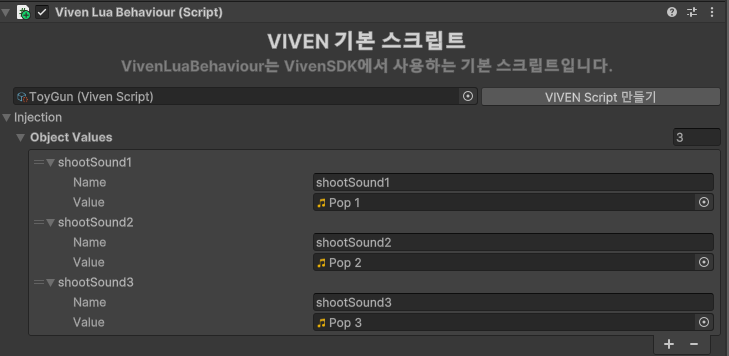
VivenBehaviour 의 Injections 에 재생할 효과음 AudioClip 들을 추가합니다.
Play / PlayOneShot / Stop
PlayOneShot()— 효과음을 1회 재생. 새 인스턴스를 만들기 때문에 중첩 재생이 가능하고, 기존에 재생 중인 소리는 끊기지 않습니다.Play()— 설정된 AudioClip 을 재생(또는 재시작). 재호출 시 이전 재생을 중단합니다.Stop()— 재생 중단.
-- injection
-- shootSound1, shootSound2, shootSound3 : AudioClip
local eventInstance
local shootEffectSounds = {}

function start()
  eventInstance = self:GetComponent("VivenEventInstance")
  table.insert(shootEffectSounds, shootSound1)
  table.insert(shootEffectSounds, shootSound2)
  table.insert(shootEffectSounds, shootSound3)
end

function shoot(x, y, z)
  -- ... (공 발사 로직) ...
  eventInstance.audioClip = shootEffectSounds[shootSoundIndex]
  eventInstance:PlayOneShot()
endFMOD 자체 기능을 사용하려면 fmod.com 공식 문서를 참고하세요.